
Turn One Prompt Into a 4-Panel Comic
A lot of AI comic results fail for a simple reason: the images may look good, but the story order is fuzzy. One prompt tries to carry setting, character, mood, action, and payoff all at once. The generator can create attractive panels from that bundle, yet the finished page still reads like disconnected moments.
The fix is usually not a longer prompt. It is a clearer structure before generation starts. If you decide what each panel needs to do, the site’s text-to-comic workspace has a much easier job turning one idea into a readable page.
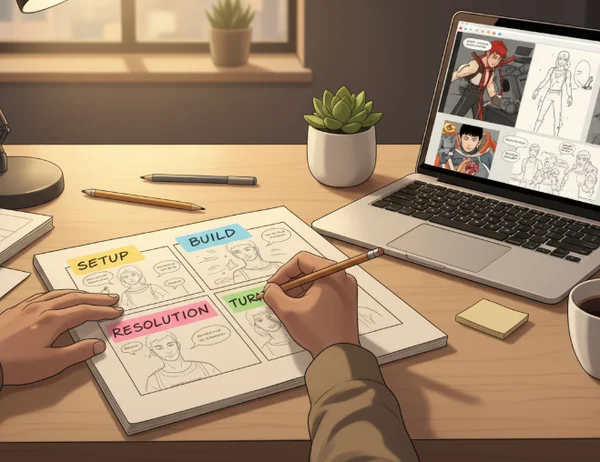
Why one good prompt can still produce a confusing comic
A single idea is not the same thing as a sequence. You may know the joke, the lesson, or the product point you want to land, but a reader still needs to move through the page in order. That means the comic needs beats, not just style words.
Educational storyboard guidance makes this point clearly. The [K20 Center storyboard activity] recommends dividing the page into 4 sections or frames and placing major events, main ideas, and supporting details in sequence. That is useful because it forces the creator to think about order first and decoration second.
When creators skip that step, they often get a familiar kind of failure. Panel one looks polished. Panel two adds a new idea without enough setup. Panel three changes the camera or the emotion too abruptly. Panel four lands, but the reader had to guess how the page got there. The problem is not that the generator ignored the prompt. The problem is that the prompt never told a page-length story in the first place.
The four-beat structure that makes generation easier
A four-panel page works well because it is short enough to control and long enough to create movement. You do not need a formal comic theory lecture to use it. You just need four jobs.
A practical version looks like this:
1. Setup
Show who is here, where the scene happens, and what the reader should notice first.
2. Build
Add the action, the tension, or the key piece of information that pushes the scene forward.
3. Turn
Change the expectation. This can be a surprise, a clearer consequence, a new obstacle, or the moment the lesson clicks.
4. Resolution
Land the payoff. Finish the joke, the explanation, or the emotional beat.
A [CU Denver four-panel comics exercise] follows a similar logic. It asks creators to choose 4 moments, connect them with a narrative arc, and draft a low-fidelity one-page comic before refining it. That is a strong reminder that even a short comic becomes easier to generate when the creator locks the moments first.
This structure also matches the promise of a fast AI tool. Instead of expecting the generator to invent pacing for you, you hand it a small sequence that already makes sense. Then style choices become refinements, not rescue work.
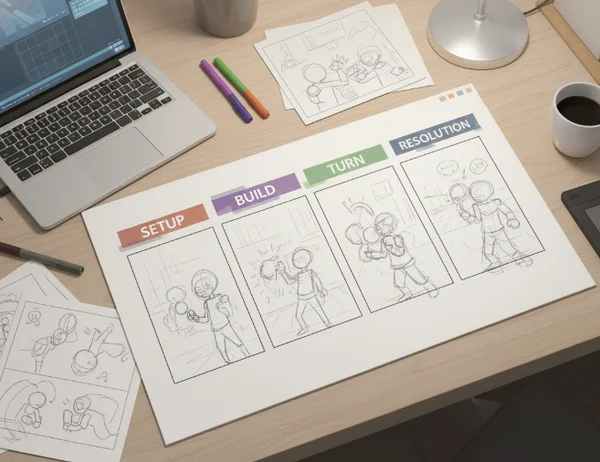
How to assign a job to each panel before you generate art
Once the four beats are clear, give each panel one job and one visual priority. This keeps your prompt from bloating.
Panel 1 should orient the reader. That means location, character, or situation comes first.
Panel 2 should move the scene. Add the action, reaction, or piece of information that changes the page from an introduction into a story.
Panel 3 should create contrast. This is often where a comic earns its energy, because the reader sees that something has shifted.
Panel 4 should close cleanly. The reader should not need another paragraph to understand why the page ended there.
This is also the moment to separate script language from style language. Write the beat first, then add the visual direction. For example, “teacher points at a volcano diagram while students lean in” is a panel job. “bright classroom, light manga shading, warm expressive faces” is a style layer. When those two roles stay separate, the comic style controls become easier to use with purpose.
Why shot variety and direction matter even in AI comics
A readable page needs more than four boxes with four captions. It also needs visual rhythm.
The [University of Florida storyboard guide] highlights shot composition choices such as wide, full, medium, and close-up views. It also notes that keeping movement in a consistent direction helps readers follow the action across frames. That advice matters just as much in AI comics as it does in hand-drawn boards.
If every panel uses the same distance, the page feels flat. If every panel changes direction dramatically, the page feels jumpy. A simple pattern often works better: wide shot for the setup, medium shot for the interaction, closer shot for the turn, and a final framing that emphasizes the payoff.
Direction matters too. A character might move left to right in one panel. If the next panel suddenly reverses that motion without a reason, the reader spends energy decoding space instead of following the story. A fast generator can produce that mismatch unless you decide the page flow in advance.
How to use the site after the beat sheet is ready
Once your four beats are set, the tool becomes much easier to steer.
Draft the page in one sentence, then split it
Start with the whole idea in plain language. Then rewrite it as four short beat lines. That is the version you should bring into generation.
Generate for structure before polish
Use the first pass to check whether the page order reads clearly. Do not chase perfect color or perfect styling yet. If the sequence is muddy, better rendering will not save it.
Test one variable at a time
After the structure works, use the instant preview flow to test one thing at a time. Change the style, the mood, or the framing, but keep the beat sheet stable. That makes it obvious whether the new result improved the page or just changed the look.

Revise the weak panel, not the whole story
If one panel is confusing, rewrite that panel’s job first. Do not throw away the entire page. Most messy outputs come from one unclear beat, not from a broken concept.
This workflow is useful for creators, teachers, and marketers because it respects speed without turning speed into chaos. The page starts with structure, the generator supplies the visual momentum, and the preview loop helps you refine only what is missing.
Key takeaways and next steps
One prompt becomes a better comic when it stops acting like a paragraph and starts acting like a sequence. Four panels are enough room for setup, movement, contrast, and resolution. That is why a simple beat sheet often improves AI output faster than a more elaborate prompt.
If a page feels random, do not reach for more adjectives first. Check whether each panel has one job, whether the moments follow a clear order, and whether the framing supports the story. Once those pieces are stable, the generator can do what it does best: turn a clear idea into a visual page much faster.
The Takeaway
Do all four-panel comics need a punchline?
No. A four-panel structure can support humor, explanation, instruction, or brand storytelling. The important part is that the fourth panel feels earned.
Should each panel use the same shot distance?
Usually no. Varying shot distance helps pacing and emphasis. Even one wider setup followed by closer moments can make a short page easier to read.
What should I change first if the page feels messy?
Change the weakest panel job first. If one panel does not clearly set up, move, turn, or resolve the page, the rest of the comic has to work too hard to compensate.