
Master Comic Generator Settings: Brand-Aligned Creations
Creating visual content that perfectly matches your brand identity is often a major challenge for marketing teams and content creators. You might wonder, how can I maintain a professional look while using AI-driven tools? Many generic tools produce random results, but the true power of a professional Comic Generator lies in its advanced customization settings.
In this guide, we will explore how to master these settings to ensure every comic strip you produce aligns with your brand’s voice and visual style. Whether you are building a marketing campaign or educational materials, understanding these technical parameters is the key to success. If you are ready to start, you can try this tool to see these features in action.
The goal of this article is to move beyond basic prompts and dive into the mechanics of the three-level advanced settings system. By the end, you will know how to control text density, color intensity, and complex layouts to create brand-consistent masterpieces every time.

Understanding Comic Generator's Advanced Settings System
The backbone of a high-quality AI comic is the balance between the user's creative vision and the AI's processing power. Our ai comic maker provides a sophisticated interface that allows you to move past simple "text-to-image" functions. Instead, you gain control over the structural and stylistic elements that define professional-grade comics.
Most users simply enter a story and click generate. However, for brand managers and serious creators, the real magic happens in the advanced panel. Here, you can toggle speech bubbles, adjust the weight of your colors, and dictate how crowded each panel feels. This level of control ensures that the output isn't just a random drawing, but a calculated piece of content marketing.
Comic Generator's Text Tools: Density & Narrative Impact
Text density refers to how much information and dialogue the AI attempts to fit into a single panel. In our comic maker online, managing this setting is crucial for readability. If the density is too high, the artwork becomes cluttered, and the reader's eye doesn't know where to land. If it is too low, the story might feel empty.
Match text density to your audience's needs. Younger readers prefer sparse text and bold imagery. For B2B audiences, denser text helps explain complex ideas visually. You can create comics from text and experiment with these levels to find the "sweet spot" for your specific project.
Color Intensity & AI Comic Maker Styles
Colors evoke emotions. A brand that focuses on "trust and security" might prefer muted, professional blues and greys, while a "fun and energetic" brand will want vibrant, high-intensity palettes. The Comic Generator allows you to adjust the "Color Intensity" to match these needs.
Setting the intensity to a higher level makes the AI lean into bold, saturated hues typical of "Super Hero" styles. Lowering the intensity creates a more sophisticated, "Graphic Novel" look that works well for storytelling and internal corporate communications. By mastering this setting, you ensure that the visual "mood" of your comic matches your brand's existing color palette.
Layout Rules: Ensuring Brand Consistency
One of the most powerful features of our free comic generator is the ability to choose from 24 different panel layouts. This goes far beyond the traditional 4-panel grid. You can select special diagonal layouts that add a sense of movement and urgency to your brand story.
Consistency in layout helps in building "brand recognition." If your weekly social media comic always uses a specific 3-panel horizontal layout, your followers will recognize your content even before they see your logo. The smart linkage system in the tool even helps you match styles—like automatically suggesting a four-panel layout when you select the "Gag" or "Funny" style.
Brand Integration Techniques
Integrating a brand into a comic isn't just about slapping a logo on the final image. It involves a deep integration of your brand style guide into the AI's generation process. This ensures that every asset you produce feels like it came from the same creative department.
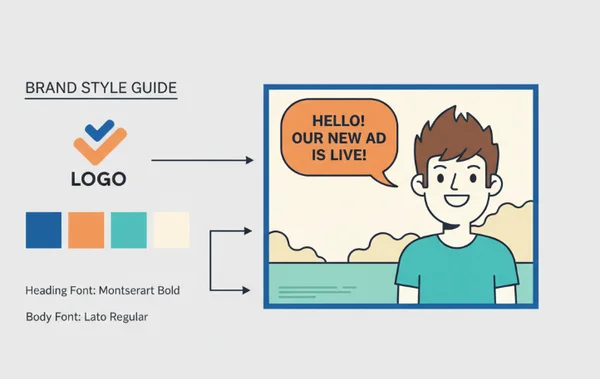
For many enterprises, the hurdle is maintaining a uniform look when different team members are using the tool. By establishing a set of "Brand Rules" for the generator, you can ensure uniformity across the board. If you want to see how these styles look, check out the tool and browse the style presets.
Creating Brand-Aligned Color Palettes
While the AI handles the heavy lifting, you can guide it by using specific keywords in your story description that complement your brand colors. If your brand is primary-color-focused (like IKEA or DHL), you should mention "bold primary colors" or "clean minimalist backgrounds" in the prompt.
Pair keyword prompts with the 'Color Intensity' slider. This duo creates custom-quality comics affordably. For a high-tech corporate brand, you might combine a "Cyberpunk" style from our style library with "Moderate Color Intensity" to get a sleek, neon-lit professional look.
Text Style Branding: Font & Bubble Customization
The way your characters speak—and the way that speech is visually represented—is a huge part of your brand voice. The Comic Generator gives you a "Speech Bubble Toggle." For some professional brands, you might want to turn off the AI-generated bubbles and add your own custom-branded typography in a tool like Photoshop later.
However, if you want a fast, all-in-one solution, use the text density settings to keep the dialogue bubbles uniform. Keeping the amount of text consistent across all panels prevents one panel from looking "too busy" compared to others, which is a hallmark of amateur design.
Layout Templates for Brand Storytelling
Think of layouts as the "architecture" of your brand story. If you are creating a "How-To" guide for your product, a linear, 4-panel grid is often the most effective. It suggests a clear, step-by-step progression that is easy for the customer to follow.
On the other hand, if you are launching a "Disruptive" new service, using the "Diagonal" or "Offset" layouts can visually represent your brand's innovative nature. By picking a "Signature Layout" for your brand, you create a visual template that makes future content creation faster and more consistent. You can find your style by testing the various 24-panel options available.
Professional Workflow Optimization
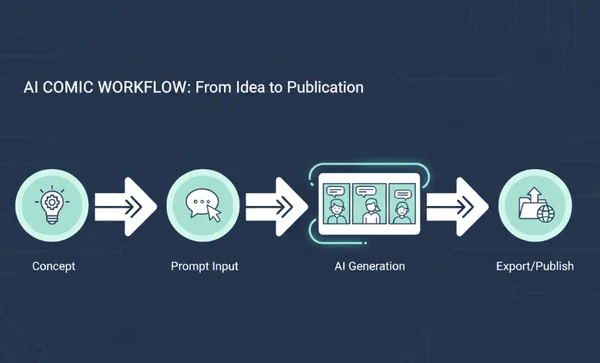
To truly master the best comic generator tool, you need to integrate it into your professional workflow. Efficiency is just as important as quality when you are producing content for a business. Using the tool effectively means knowing how to move from a concept to a finished, high-resolution download in minutes. This requires a bit of planning before you even type your first prompt into the 3000-character story box.
Batch Processing for Efficiency
For marketing campaigns, you often need more than one comic strip. You might need a series of five comics for a week-long social media blast. The best approach is to write all five story descriptions first. This allows you to keep the "Style" and "Advanced Settings" identical for each generation.
Batch processing isn't just about saving time; it's about maintaining a visual narrative flow. When you generate multiple panels in one session using the same settings, the AI maintains a tighter stylistic "memory" of your inputs. This ensures that characters and environments remain consistent throughout the series.
Integration with Design Workflows
The comics generated on our platform are high-quality, but for professional use, you might want to integrate them into other software. Export high-quality comics directly into your workflow. Use them in PowerPoint, Canva, or Illustrator for professional touch-ups.
Our tool supports multiple output formats, making it easy to slide these AI-generated visuals into your existing design pipeline. The "Download and Share" feature ensures that your work is ready for immediate use or further refinement.
Efficiency Tips for Professional Content Teams
Standardizing your creative assets is the first step toward scaling your content production. High-performing teams often create a shared library of "prompt starters" that align with brand values. This ensures that whether a marketing intern or a senior designer is using the tool, the output remains high-quality.
- Asset Organization: Save your generated comics in a centralized folder categorized by campaign or department.
- Naming Conventions: Use descriptive names like "Q4-ProductLaunch-Panel1" to make retrieval easier for your social media managers.
- Consistency Audits: Review your comic series once a month to ensure the visual tone hasn't drifted from your initial brand guidelines.
- Reusable Prompts: Keep a document of prompts that successfully generated your brand's "look" to save time on future projects.
By treating the generator as a core part of your tech stack, you remove the friction between ideation and publication. This systematic approach allows you to iterate faster, testing different visual styles for your audience without wasting a massive design budget.
Performance Optimization Tips
To get the most out of the AI, keep your story descriptions clear and concise. While the tool supports up to 3000 characters, the most effective prompts are often between 500 and 1000 characters. This gives the AI enough detail to be creative without becoming "confused" by too many conflicting instructions.
Also, remember to use the "Preview" function. If the layout doesn't look quite right, don't be afraid to click "Regenerate." The AI learns from the slight variations in your input, and often, the second or third generation is the "perfect" one for your brand standards.
Your Next Step to Professional-Grade Comics
Mastering the advanced settings of a Comic Generator transforms a simple fun tool into a powerful marketing and communication engine. By controlling text density, color intensity, and layout rules, you bridge the gap between "AI-generated" and "Brand-aligned."
Consistency is the soul of branding. With the techniques we've discussed—from color palette integration to professional workflow optimization—you are now equipped to create comics that don't just look good, but also work hard for your brand. Transform your brand storytelling today—no artistic expertise required. We invite you to start your first project today and see how easy it is to bring your brand's stories to life with precision and style.
Frequently Asked Questions About Advanced Comic Settings
How can teams ensure brand consistency when multiple people create comics?
The best way to maintain consistency is to create a "Brand Comic Guide." This document should list the specific "Style" and the exact "Advanced Settings" (Color Intensity and Text Density) that your team should use. When everyone uses the same parameters on the online comic maker, the results will remain uniform regardless of who is typing the prompt.
Can I get the AI to use my specific brand colors?
While the tool generates colors based on the chosen style, you can influence the palette by including your brand's color names in the story description. For example, adding "The scene features a dominant navy blue and soft grey palette" will guide the AI. Combined with the "Color Intensity" slider, you can get very close to your official brand colors.
Are there any limits to the AI comic styles for my business?
AI is incredibly powerful but can sometimes struggle with very specific, complex technical diagrams or high-level character consistency across 50+ panels. For most marketing and educational uses (1-10 panels), it's excellent. If you need extreme precision, we recommend using the tool to generate the base artwork and then doing a final "polish" in a traditional design program.
What's the best way to balance text with pictures?
If your story is very long, try to break it into more panels rather than crowding one panel with text. Use the "24-grid layout" options to spread the narrative out. Aim for no more than two speech bubbles per panel to keep the visuals clear. You can test different layouts to see which one fits your text length best.
Are there enterprise solutions for managing brand standards across multiple users?
Currently, the best enterprise solution is to standardize your "Prompt Templates." By sharing successful prompts and setting configurations among your team, you ensure a high standard of quality. The tool is designed to be accessible, so any team member can start creating immediately. Explore enterprise solutions if you need specialized support for your organization.